среда, 24 января 2018 г.

вторник, 9 января 2018 г.
4 CPU interconnect/cache coherence entities
1. Interconnect solution - bus/crossbar
2. Frequency
3. Speed
4. Cache coherence protocol
2. Frequency
3. Speed
4. Cache coherence protocol
понедельник, 8 января 2018 г.
AMD EPYC short info
Intel Skylake SP To AMD EPYC Die To Die Latency
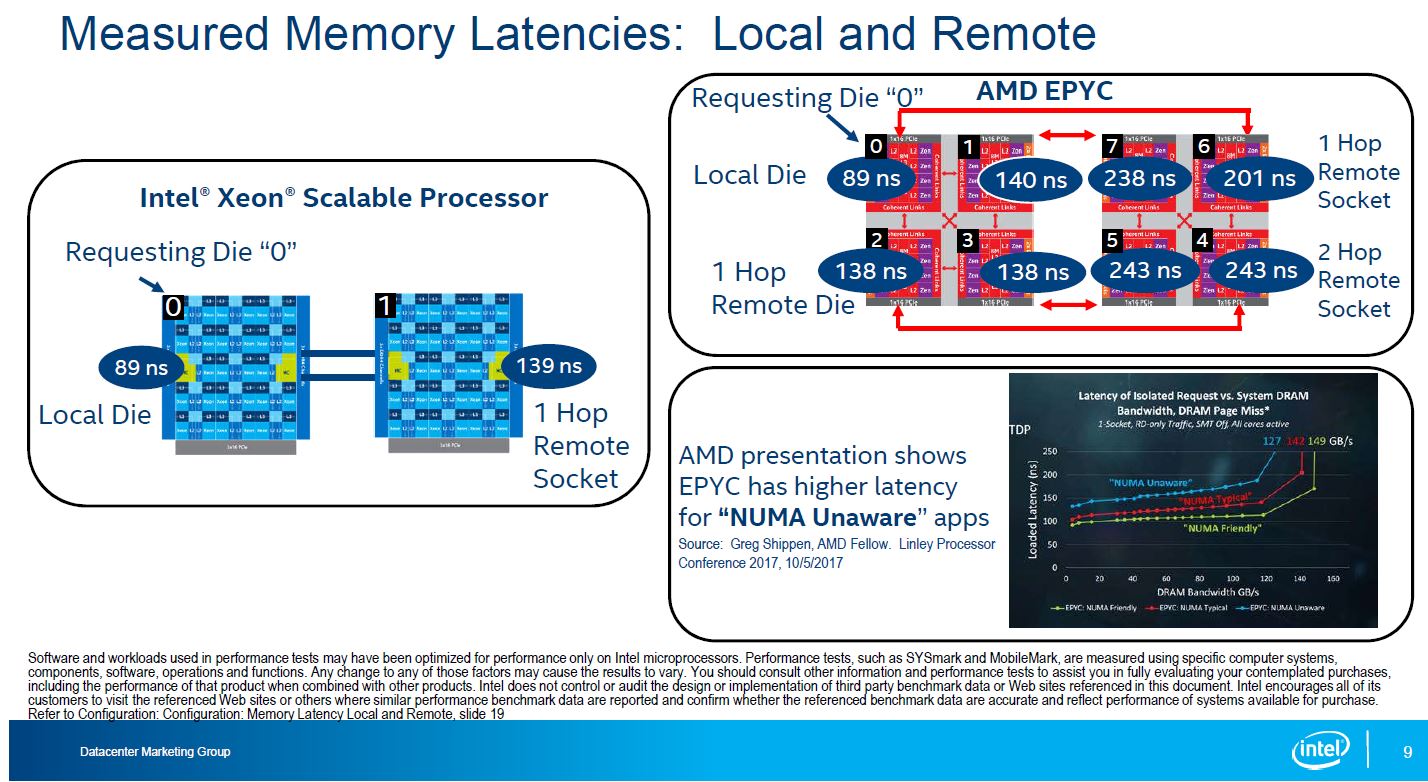
AMD EPYC Infinity Fabric On Package V Intel 4P 8180 UPI Latency
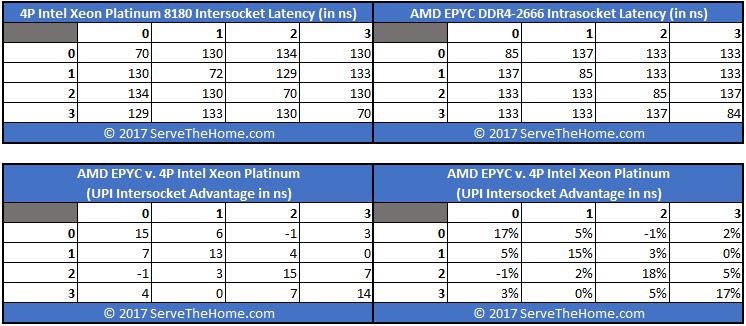
AMD Multi-Chip Module Architecture
InfinityFabric
AMD EPYC
понедельник, 30 октября 2017 г.
x86 4+ sockets systems, CPU interconnect, and why Bull
updated.

The advantages of a “glueless” architecture:
- no requirement for specific development nor expertise from the server manufacturer. Every server makers can build a 8-socket server.
- thus the cost of a 4-socket and 8-socket is also less
The disadvantages of a “glueless” architecture:
- the TCO goes up when scaling out
- limited to 8-socket servers
- difficult to maintain cache coherency when socket increases
- performance increase not linear
- price/performance ratio decreases
- efficiency not optimal when running large VMs
- up to 65% of Intel QPI links bandwidth consumed to address QPI source broadcast snoopy protocol
The primary workloads concerned by the Intel QPI source broadcast snoopy issue are:
- Java applications
- large databases
- latency sensitive applications
Useful reading about snoopy protocols(MESI/MESIF/QPI):
Glued architecture


BCS2 provides 7 XQPI links to connect to up 7 others modules in order to build a maximum of 16-socket system
Bandwidth :
• 1 XQPI link : 14 GT/s each direction
• 1 Transfer = 2 bytes => 14 GT/s = 224 Gb/s
• Transfer rate between 2 modules:
• 4 sockets (4 XQPI links) : equivalent to ~88x 10 GigE ports
• 8 sockets (2 XQPI links) : equivalent to ~44x 10 GigE ports
• 16 sockets (1 XQPI link) : equivalent to ~22x 10 GigE ports
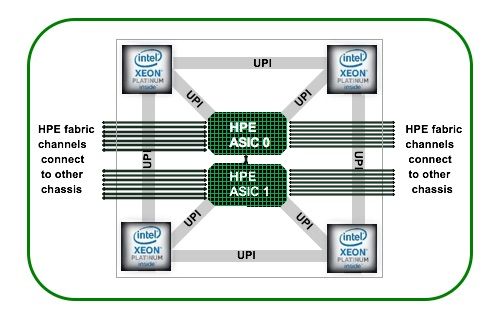
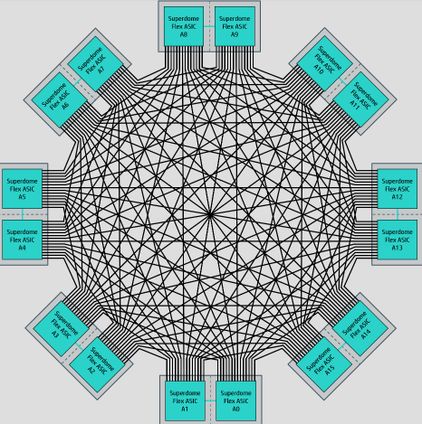
2) HPE Superdome X sx3000 crossbar - up to 8 hops, 486 ns
2) HPE Superdome X sx3000 crossbar - up to 8 hops, 486 ns


3)SGI NUMAlink 7 - up to 500ns


4)Huawei KunLun - NCM > 2 hops

5) Ubox XNC - eXternal Node Controller/UNC - 3rd generation of BCS - Bullion Sequana S1600 - S3200 . The UBox is a 5U chassis imbedding several
UPI Node Controllers (UNC). The UNC is the
6th generation of eXternal Node Controller
(XNC) designed and developed by Atos for
Intel processor-based servers. It is a VLSI-type
(Very Large-Scale Integration) integrated
circuit derived from mainframe technologies
and tuned for High Performance Computing.
This innovative and unique Atos technology
makes it possible to interconnect up to
sixteen 2-socket modules allowing to go
up to 32-socket SMP systems in a Cache
Coherent Non-Uniform Memory Access (CCNUMA) architecture.
up to 8 nodes - classic Intel glueless -
up to 8 nodes - classic Intel glueless -

8+ nodes
Advantages:
- with Ubox - 4+ socket server with Intel Xeon Gold processors
- transparent CascadeLake support.
2 hops in 16-socket system Bullion Sequana S1600, full bandwidth.
Topology: full mesh
Frankly, it is not definetely 3rd generation of BCS. It is third-party solution, product of Numascale.
Core technologies: SCI - Scalable Coherent Interconnect.
https://www.numascale.com/index.php/scale-up-servers/
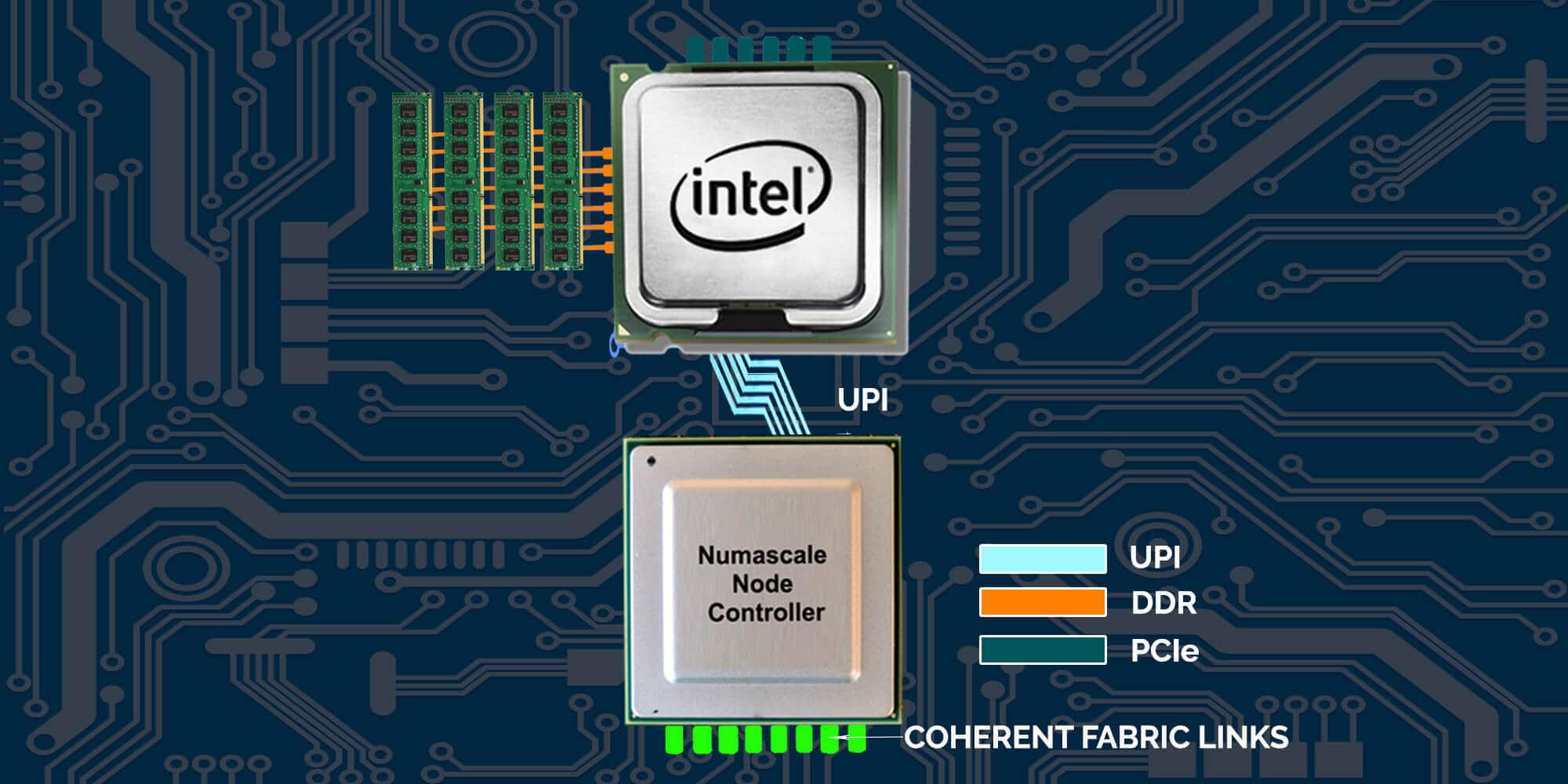
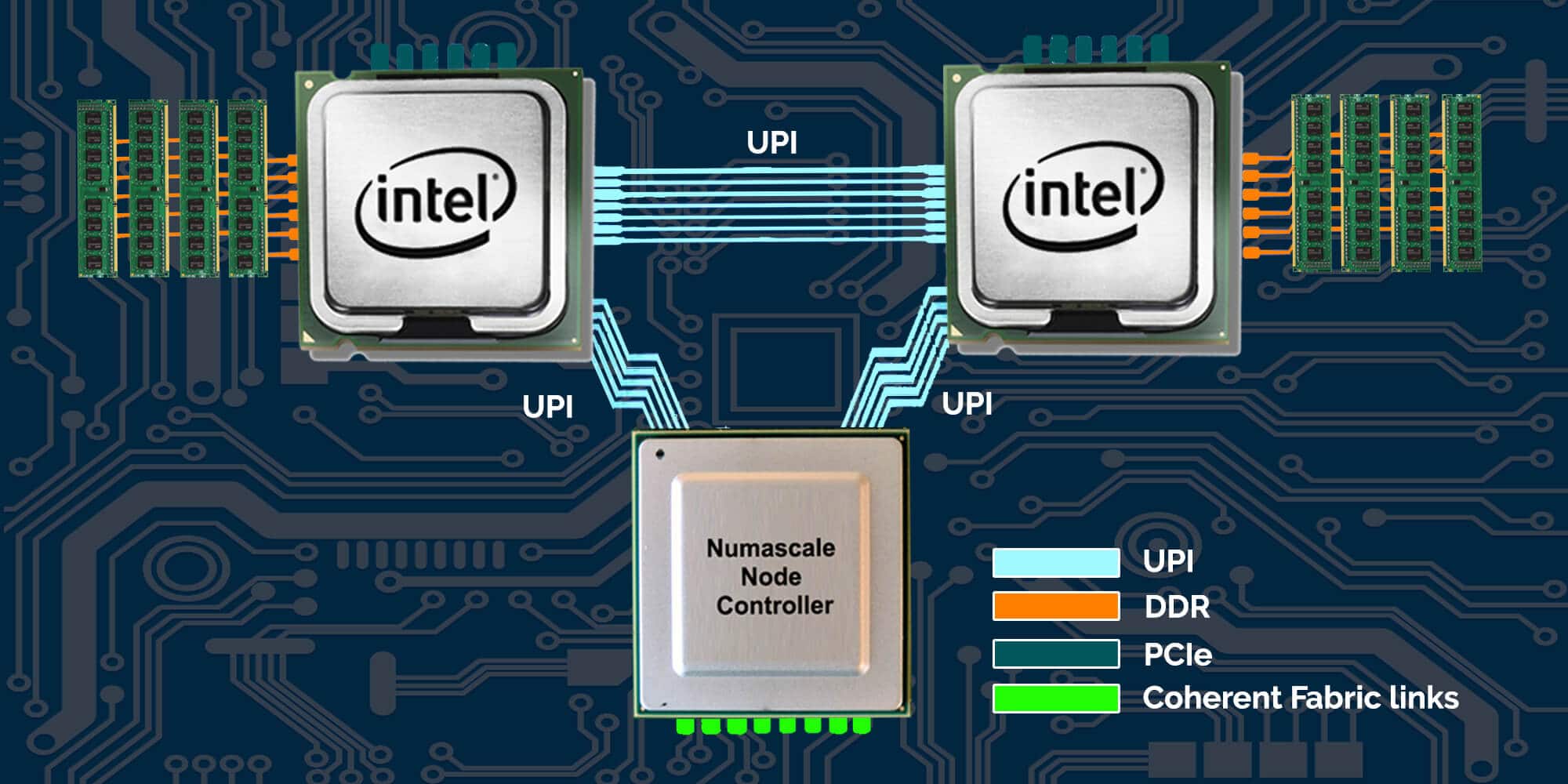
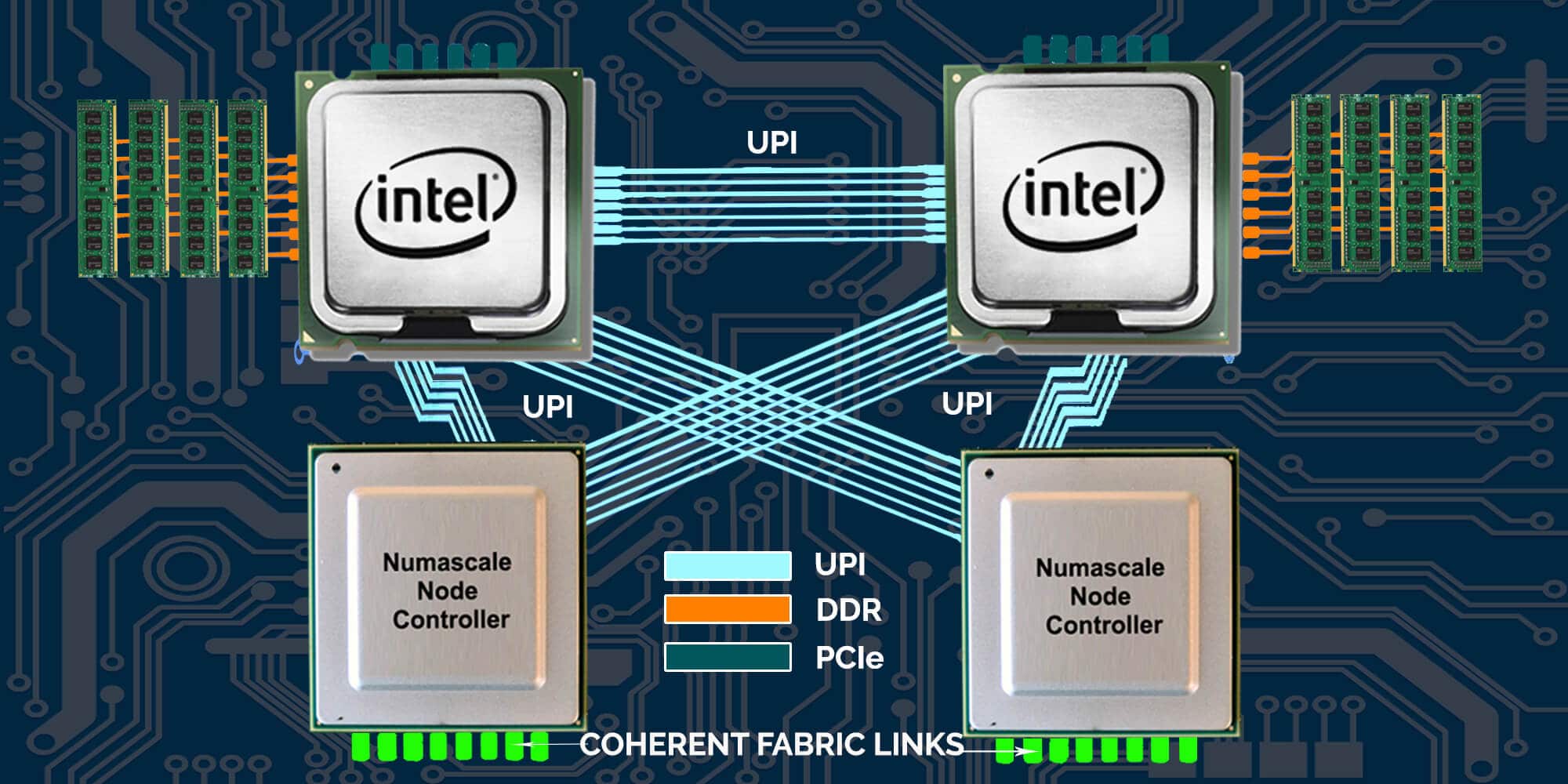
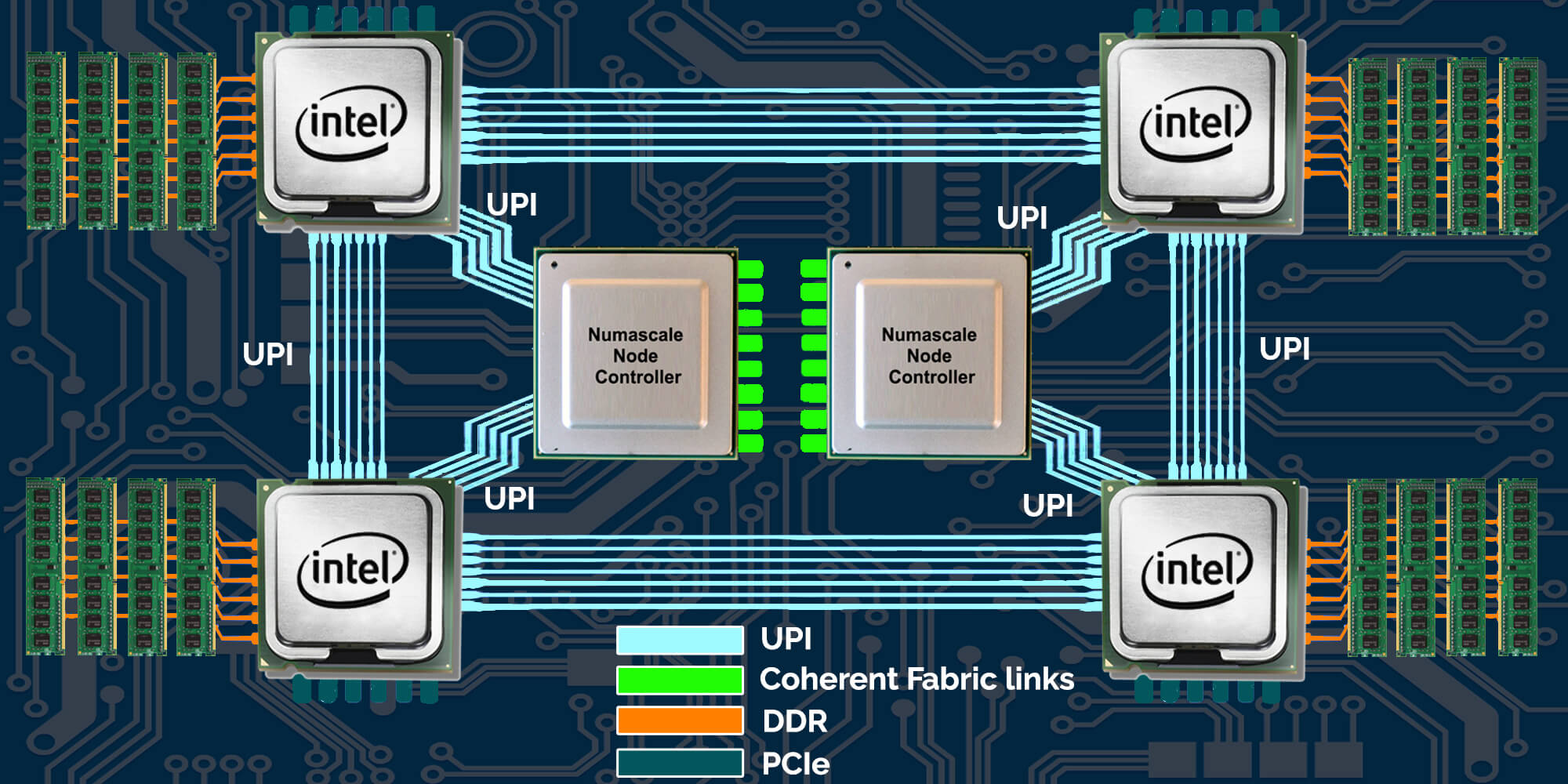

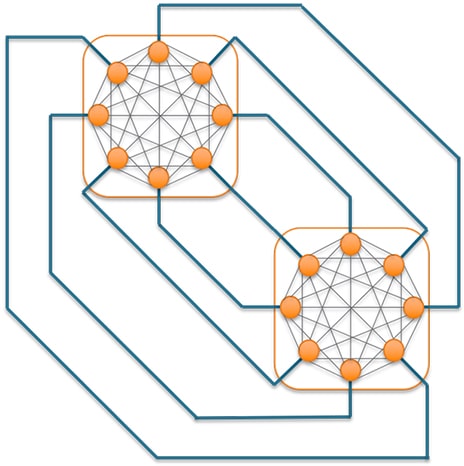
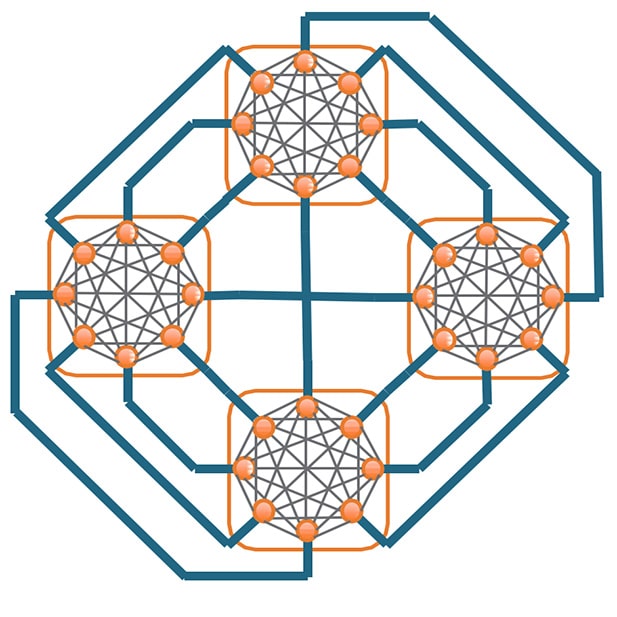

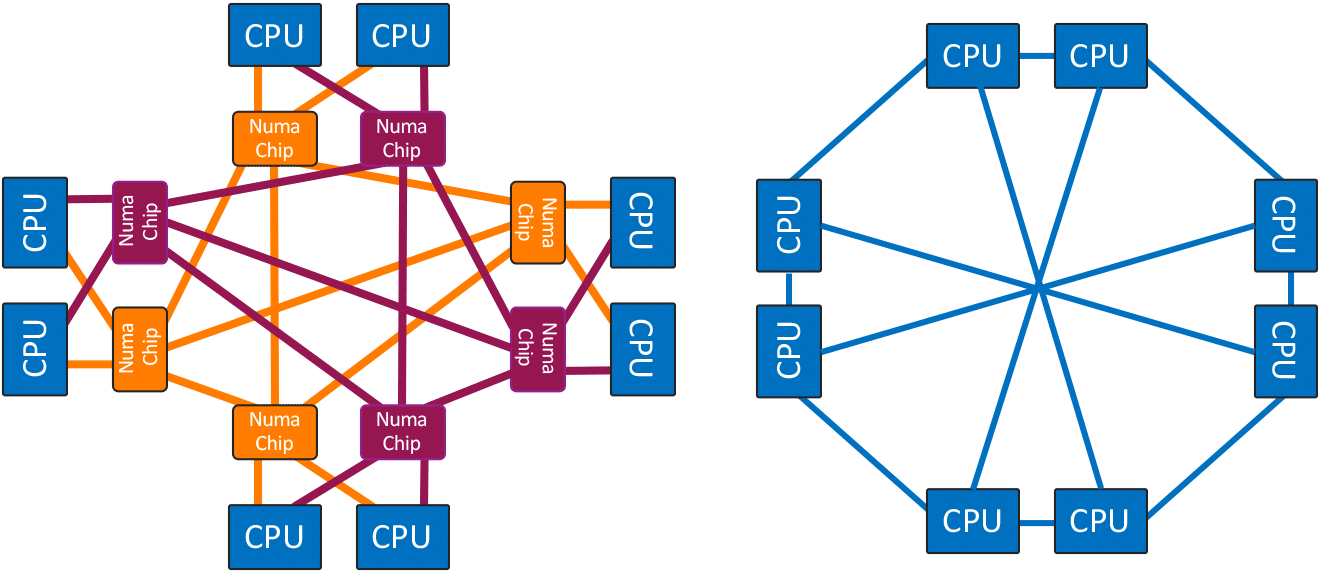
To meet customer application requirements, 2 types of UBox models can be proposed:
• Enterprise: this is the standard configuration providing all-to-all topology between CPUs. It provides both the performance and the high availability needed for high memory demanding applications like SAP HANA.
• High Performance: well suited for High Performance Computing, doubling the bandwidth in the all-to-all topology between CPUs. It provides exceptional performance for intensive CPU workload. The UBox is autonomous in term of power, cooling and local management.

Entreprise mode:

High performance mode:

6) HPE Superdome Flex/Numalink8 - up to 32sockets - 400ns
Advantages - 4+ socket server with Intel Xeon Gold processors
210 GB/s of bi-sectioned crossbar bandwidth at 8-sockets
425+ GB/s at 16-sockets
850+ GB/s at 32-sockets
Disadvantages - no transparent CascadeLake support.
Topology: full mesh
Frankly, it is not definetely 3rd generation of BCS. It is third-party solution, product of Numascale.
Core technologies: SCI - Scalable Coherent Interconnect.
https://www.numascale.com/index.php/scale-up-servers/
Single socket, single rail
Dual socket, single rail
Dual socket, single rail
Quad socket
Single Chassis
Dual Chassis
Quad Chassis Topology
Eight Chassis Topology
8 Sockets, Double and Single data planes
To meet customer application requirements, 2 types of UBox models can be proposed:
• Enterprise: this is the standard configuration providing all-to-all topology between CPUs. It provides both the performance and the high availability needed for high memory demanding applications like SAP HANA.
• High Performance: well suited for High Performance Computing, doubling the bandwidth in the all-to-all topology between CPUs. It provides exceptional performance for intensive CPU workload. The UBox is autonomous in term of power, cooling and local management.

Entreprise mode:

High performance mode:

6) HPE Superdome Flex/Numalink8 - up to 32sockets - 400ns
Advantages - 4+ socket server with Intel Xeon Gold processors
210 GB/s of bi-sectioned crossbar bandwidth at 8-sockets
425+ GB/s at 16-sockets
850+ GB/s at 32-sockets
Disadvantages - no transparent CascadeLake support.
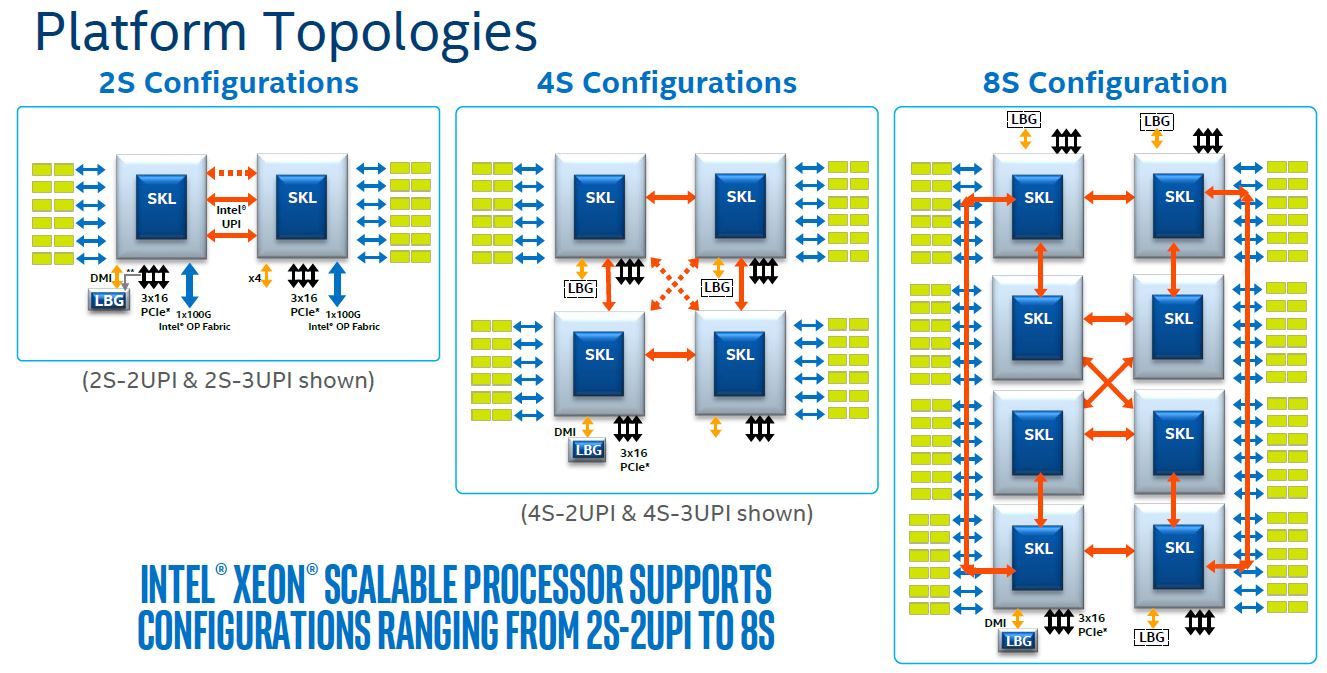
Glueless architecture

5)Intel Xeon scalable 2-8 sockets topologies - up to 2 hops, with affected bandwidth.
6) Lenovo 8-socket topology - up to 2 hops, with affected bandwidth.

воскресенье, 19 марта 2017 г.
Some remarks for SAP AS ABAP single thread performance on Intel Xeon E5-26xx v3/v4 and Power8
Source material for this post was observation of single thread performance SAP kernel 7.49 PL100 on different platforms. I have 3 platforms for tests – Intel Xeon E5-2670v3, Intel Xeon E5-2643v4 and Power8(10-core 3.42 GHz POWER8 Processor Card). I have single thread task – ABAP program for generating month detailed general ledger report, so, this post explain single thread execution of ABAP on different generations of cpu(Intel)/architectures(Power).
So, performance profile for my task is(screen for Intel E5-2643v4):

Test performed on 3 different instances – PAS on E5-2670v3(HT enabled), AAS on E5-2643v4(HT enabled) and Power8.
Start conditions;
Software: PAS/AAS:
Intel platform:
- VMware 6.0
- RHEL 6.8
- SAP kernel 7.49 PL100
Power8 platform:
- SLES 11 SP4
- SAP kernel 7.49 PL100
HANA appliance:
- RHEL 6.5
- HANA PLATFORM Ed.1.0, SPS10
Intel platform: 8vCPU, 64Gb vRAM (physical: Dell 730xD and M630)
Power8 platform: 2xPOWER8 Processor Card, 256Gb RAM (S822)
HANA database works on certified appliance Dell R930 (1,5Tb RAM, dual E7-8880v3).
AAS on Power8 works on LPAR with full resources of physical server.
As of start conditions and single thread task, to speed up the execution, i need more frequency on core and larger cache for data(all levels), to minimize CPU-RAM exchange. All AS on Intel platform works in virtualized environment, so i need to consider vNUMA and VM settings to avoid or minimize NUMA node interleaving.
Very little excursus for NUMA/vNUMA:
In ESXi 5, virtual NUMA, or vNUMA was introduced. vNUMA exposes the NUMA topology
of the ESXi host to the guest OS of the VM. This enables NUMA-aware guest OSs and applications to make the most efficient use of the underlying hardware’s NUMA architecture. This can
provide significant performance benefits when virtualizing OSs and applications that make use
of NUMA optimizations.When a VM is running on an ESXi 5 host and has been upgraded to virtual hardware version 8 or above, the VM will be able to make use of vNUMA.
of the ESXi host to the guest OS of the VM. This enables NUMA-aware guest OSs and applications to make the most efficient use of the underlying hardware’s NUMA architecture. This can
provide significant performance benefits when virtualizing OSs and applications that make use
of NUMA optimizations.When a VM is running on an ESXi 5 host and has been upgraded to virtual hardware version 8 or above, the VM will be able to make use of vNUMA.
What we must to consider:
For NUMA scheduling purposes, a NUMA client (Physical Proximity Domain (PPD)). is created per virtual machine and assigned a NUMA home node.A Virtual Proximity Domain (VPD) is presented to the guest as the NUMA node. We must avoid spanning VPDs across PPDs, if possible.
If you are not sure with right manual NUMA layout configuration, you can set N virtual sockets with 1 core, and use this parameter:
- numa.autosize
By default NUMA optimization does not count the HTs when determining if the virtual machine could fit inside the NUMA home node. You can manage it with parameter:
- numa.vcpu.preferHT
Note that the NUMA scheduler is focused on consuming as much local memory as possible, it tries to avoid consuming remote memory. vNUMA is actually enabled only for a virtual machine with 9 or more vCPUs. This policy can be overridden with the following advanced virtual machine attribute
- numa.vcpu.min
Numa alignment for non-wide VMs: wherever possible, around even multiples of the NUMA node. For example, on a hex-core system, use to 2, 3, or 6 cores.
The NUMA/vNUMA area much larger, so, i think to explain it at next article of exploitation SAP applications on VMware environment.
So, going back to our task: for E5-2670v3 we haven’t problems with NUMA, because AS not wide-vm machine, only 8 vcpu on 12 core pCPU sockets:

But on E5-2643v4 we have 6-core pCPUs and we see 2 NUMA nodes for our VM:

To place VM to one NUMA node for avoiding interleaving i need to enable preferHT option:

For Power8 system i enabled Fixed Maximum Frequency Mode with 3.6Ghz per core and SMT=off.
For E5-26xx systems i enabled High Performance mode for host. Also, for E5-2643v4 i have 27,5% difference between results with preferHT option, because 8vcpu VM executed on 2 NUMA nodes with interleaving (wp can be changed during execution, but virtual memory pages don’t move so quick between NUMA nodes as vcpu executions – refer to vsPhere cpu scheduler document)- 80 minutes execution against 58 minutes on single NUMA node system.
And also there are same recommendations to align SAP instances in vSphere environment:
All statistics for Power8 system collected with nmon utility – you can find materials for use and buid reports here:
Power8 cpu load – no waits:

IO wait time of dialog processes during execution on Power8:

CPU time of dialog processes during execution on Power8:

Final result table – E5-2643v4 is leader. Yes, cоmparison is not honest, because i ignore NUMA placing of AAS on Power8 platform, but, according to better bandwith between cpu-ram on Power8 system, effect can’t be sagnifiant : max memory bandwith on E5-2643v4 – 76.8 GB/s vs 204 GB/S on Power8.
Other tested t-codes are not so abap/cpu intensive, their metrics have only informational disposition.

Overall conclusion – unfortunately, there is no any advantages in single thread abap execution on Power8 platform, because now available 6,8 physical core high-frequenced processors(E5-2643v4, E5-1680v4).
Resolve error during Embedded Statistics Service Migration SAP HANA SPS10
Source system with error during Embedded Statistics Service Migration :
OS – RHEL 6.5
DB – SAP HANA version 1.00.102.03.1449674847
DB – SAP HANA version 1.00.102.03.1449674847
Problem:
You got incorrect status after start Embedded Statistics Service Migration(according note 2092033) by executing this command:
alter system alter configuration (‘nameserver.ini’,’SYSTEM’) set (‘statisticsserver’,’active’)=’true’ with reconfigure
When you check status of migration by executing SQL
select value from _SYS_STATISTICS.STATISTICS_PROPERTIES where key = ‘internal.installation.state’
you got this error:
“Done (error) since <timestamp>”
Resolution:
During migration some SQL procedures from _SYS_STATISTICS schema cannot be compiled. Reason is old SQL in procedures _SYS_STATISTICS.ALERT_CHECK_INACTIVE_STREAMING_APPLICATION_STATE and
_SYS_STATISTICS.ALERT_CHECK_INACTIVE_STREAMING_ADAPTER_STATE
By default, SQL engine doesnt work with such syntax in HANA SPS10, so you need to enable processing of old SQL – see note 2241598 – Changed UPDATE FROM syntax can cause ‘invalid table name’ error
You got incorrect status after start Embedded Statistics Service Migration(according note 2092033) by executing this command:
alter system alter configuration (‘nameserver.ini’,’SYSTEM’) set (‘statisticsserver’,’active’)=’true’ with reconfigure
When you check status of migration by executing SQL
select value from _SYS_STATISTICS.STATISTICS_PROPERTIES where key = ‘internal.installation.state’
you got this error:
“Done (error) since <timestamp>”
Resolution:
During migration some SQL procedures from _SYS_STATISTICS schema cannot be compiled. Reason is old SQL in procedures _SYS_STATISTICS.ALERT_CHECK_INACTIVE_STREAMING_APPLICATION_STATE and
_SYS_STATISTICS.ALERT_CHECK_INACTIVE_STREAMING_ADAPTER_STATE
By default, SQL engine doesnt work with such syntax in HANA SPS10, so you need to enable processing of old SQL – see note 2241598 – Changed UPDATE FROM syntax can cause ‘invalid table name’ error
So, according note
2241598 – Changed UPDATE FROM syntax can cause ‘invalid table name’ erroryou need perform some modifications of parameters in these files:
indexserver.ini
[sql]enable_old_update_from_behavior = true # default : false
xsengine.ini
[sql]
enable_old_update_from_behavior = true # default : false
2241598 – Changed UPDATE FROM syntax can cause ‘invalid table name’ erroryou need perform some modifications of parameters in these files:
indexserver.ini
[sql]enable_old_update_from_behavior = true # default : false
xsengine.ini
[sql]
enable_old_update_from_behavior = true # default : false
Then recompile procedures – execute these statements in SQL console:
ALTER PROCEDURE _SYS_STATISTICS.ALERT_CHECK_INACTIVE_STREAMING_APPLICATION_STATE RECOMPILE WITH PLAN;
ALTER PROCEDURE _SYS_STATISTICS.ALERT_CHECK_INACTIVE_STREAMING_ADAPTER_STATE RECOMPILE WITH PLAN;
ALTER PROCEDURE _SYS_STATISTICS.SYS_STATISTICS.STATISTICS_SCHEDULABLEWRAPPER RECOMPILE WITH PLAN;
ALTER PROCEDURE _SYS_STATISTICS.ALERT_CHECK_INACTIVE_STREAMING_APPLICATION_STATE RECOMPILE WITH PLAN;
ALTER PROCEDURE _SYS_STATISTICS.ALERT_CHECK_INACTIVE_STREAMING_ADAPTER_STATE RECOMPILE WITH PLAN;
ALTER PROCEDURE _SYS_STATISTICS.SYS_STATISTICS.STATISTICS_SCHEDULABLEWRAPPER RECOMPILE WITH PLAN;
Then again execute migration of statistics server (note 2092033) by executing:
alter system alter configuration (‘nameserver.ini’,’SYSTEM’) set (‘statisticsserver’,’active’)=’true’ with reconfigure
Check any errors at indexserver diagnosis file
alter system alter configuration (‘nameserver.ini’,’SYSTEM’) set (‘statisticsserver’,’active’)=’true’ with reconfigure
Check any errors at indexserver diagnosis file
Подписаться на:
Сообщения (Atom)